'/%3e%3cpath%20d='M377.273%20445.285V406.281L462.052%20272.697H496.711V325.646H476.602L426.988%20404.26V405.877H549.76V445.285H377.273ZM477.209%20479.641V433.361L478.219%20416.285V272.697H525.004V479.641H477.209Z'%20fill='white'/%3e%3cpath%20d='M202.789%20479.639V443.666L278.271%20377.582C283.93%20372.462%20288.746%20367.78%20292.721%20363.536C296.695%20359.225%20299.727%20354.914%20301.815%20350.602C303.903%20346.224%20304.947%20341.475%20304.947%20336.355C304.947%20330.629%20303.701%20325.745%20301.209%20321.703C298.716%20317.594%20295.281%20314.428%20290.902%20312.205C286.523%20309.982%20281.505%20308.87%20275.846%20308.87C270.12%20308.87%20265.101%20310.049%20260.79%20312.407C256.479%20314.697%20253.11%20318.032%20250.685%20322.41C248.328%20326.789%20247.149%20332.111%20247.149%20338.376H199.758C199.758%20324.297%20202.924%20312.137%20209.256%20301.898C215.588%20291.659%20224.481%20283.777%20235.933%20278.253C247.452%20272.662%20260.824%20269.866%20276.048%20269.866C291.744%20269.866%20305.385%20272.493%20316.972%20277.748C328.559%20283.002%20337.518%20290.345%20343.85%20299.776C350.25%20309.14%20353.45%20320.019%20353.45%20332.414C353.45%20340.296%20351.867%20348.11%20348.701%20355.857C345.534%20363.604%20339.842%20372.159%20331.624%20381.523C323.473%20390.886%20311.886%20402.103%20296.864%20415.171L272.107%20438.008V439.321H355.976V479.639H202.789Z'%20fill='white'/%3e%3cdefs%3e%3clinearGradient%20id='paint0_linear_212_9'%20x1='428.754'%20y1='59.2143'%20x2='256.043'%20y2='631.628'%20gradientUnits='userSpaceOnUse'%3e%3cstop%20stop-color='%23FD7E43'/%3e%3cstop%20offset='1'%20stop-color='%23ED1447'/%3e%3c/linearGradient%3e%3c/defs%3e%3c/svg%3e)
It won't turn off
until you're awake.
Every other alarm ends with a button you can press half-asleep. Alarm24 replaces that button with a mission you have to actually complete: solve it, walk it, or scan it. Then, and only then, the ringing stops.
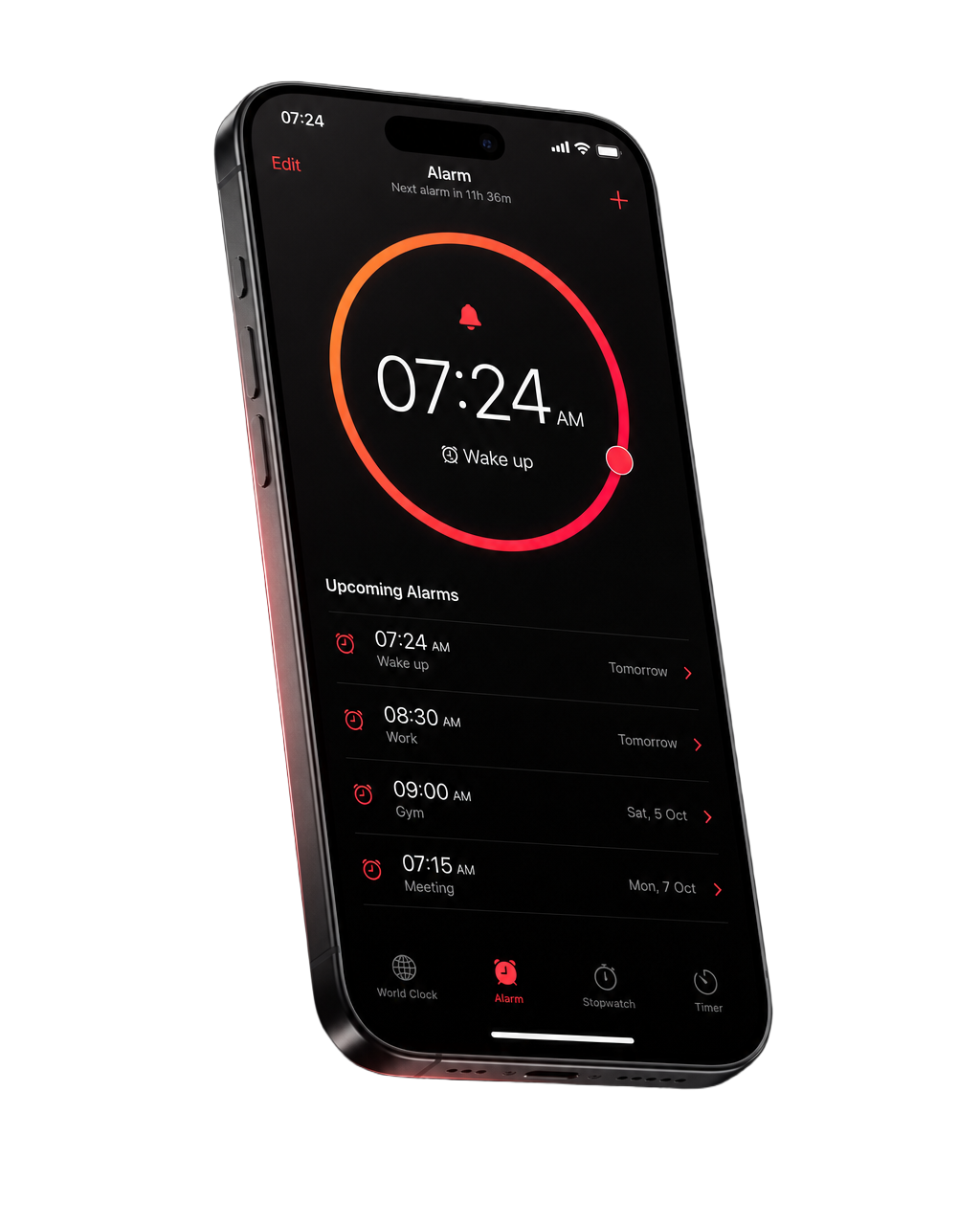
How it works
Four steps between you and a snoozed alarm.
- 1
Set the alarm
Pick a time and repeat pattern, choose a sound, and add one or more wake-up missions. Set the time zone to follow you or stay fixed.
- 2
It rings
On iOS 26 and later, Guarded Mode uses Apple's AlarmKit so the alarm stays prominent through Silent mode and Focus. On older versions, Alarm24 falls back to a redundant series of time-sensitive notifications.
- 3
Complete your mission
There is no stop button. The alarm screen shows the mission you chose, and it stays until every step in the chain is verified.
- 4
You're actually up
The alarm stops only after the mission is verified. Turn on the fall-back-asleep check and Alarm24 will circle back a few minutes later to make sure you stayed up.
Wake-up missions
Eight ways to prove you're awake.
Pick the one that actually works on you. Every mission is configurable, and every one of them has to be completed before the alarm will stop.
Math
Solve equations. Four difficulty levels, your pick of operations, optional decimals and operator precedence.
Memory
Watch a sequence of symbols, then repeat it back. Choose how many cards and how many rounds.
Typing
Type a sentence exactly as shown. Pasting is rejected and autocorrect is off; case and punctuation sensitivity are up to you.
Shake
Shake the phone until the counter fills. Three sensitivity levels, with debounce so a single jolt can't fake it.
Steps
Get out of bed and walk. Steps are counted from the moment the mission starts, not from your day's total.
Squat
Do squats, counted by the motion sensor. Double-count protection built in, up to fifty reps.
QR / Barcode
Scan a code you saved in advance. Stick it on the coffee machine, the bathroom mirror, or the front door.
Photo
Retake a photo of a place you chose in advance. Matched on your device; blurry and too-dark shots are rejected.
Chain them together
One mission not enough? Stack them. Solve two equations, then walk thirty steps, then scan the code on the kettle. The alarm will not stop until the last step in the chain is verified.
Built to be hard to cheat
The details that decide whether you get up.
An alarm you can defeat in two seconds isn't an alarm. These are the parts that close the shortcuts.
Snooze that doesn't cheat
Snooze doesn't skip the mission. It unlocks only after you finish the first step, and you can cap how many times it's allowed, or switch it off entirely.
Fall-back-asleep check
The classic failure: mission done, phone down, straight back to sleep. Turn this on and Alarm24 checks in minutes later. No answer, and the alarm comes back.
Verified stop, by design
The alarm can only stop after a one-time verification issued by the mission itself, valid for sixty seconds and never reusable. No shortcut, deep link or notification action can stand in for it.
Survives a force quit
The active alarm session is written to disk on every change. Kill the app mid-mission and it reopens exactly where you left off, still ringing and still unfinished.
Honest emergency exit
Hold the emergency button for ten seconds and it opens three very hard maths questions. It does not silence the alarm. It just gives you a harder way out when the camera or your legs aren't cooperating.
Sensor fallbacks
Camera denied, room too dark, motion permission off? Alarm24 swaps in a different real mission and tells you why. It never quietly gives up and lets the alarm die.
Reliability history
A local log of every alarm scheduled, fired, missed, snoozed and stopped. When you swear it didn't ring, you can check what actually happened.
Fourteen sounds, gentle or brutal
Eight categories from Soft start and Nature through to Siren and Deep sleepers, with optional gradual volume ramp and vibration.
Live Activity and Dynamic Island
See the pending alarm on the Lock Screen and in the Dynamic Island, so you always know it's armed before you fall asleep.
Travel-proof scheduling
Choose whether an alarm follows local time as you travel or stays pinned to a saved time zone. Daylight-saving jumps and missing hours are handled explicitly.
Dark, light, or system
A pure dark interface for bedside use at 3 a.m., with light and system options if you prefer.
Works with no signal
Alarm24 makes no network requests at all. On a plane, in a basement, or in airplane mode, it behaves identically.
Straight answers
What iOS lets an alarm app actually do.
Most alarm apps are vague about this. Here is exactly what you get, and on which version of iOS.
Guarded Mode
Built on Apple's AlarmKit. The alarm stays prominent during Silent mode and Focus, and appears as a system alarm on the Lock Screen. The system screen's primary button starts your mission; it cannot silence the alarm.
Compatibility Mode
AlarmKit doesn't exist on these versions, so Alarm24 schedules a redundant series of time-sensitive notifications and plays the alarm sound itself when the app is open. Some alarm protections are unavailable due to system limits, and the app says so plainly on screen.
Alarm24 does not use Apple's Critical Alerts, and it does not use private APIs or background tricks to keep sound playing. We would rather tell you the truth about the limits than promise something iOS won't deliver. For anything with serious consequences, keep a second, independent alarm.
Privacy
The app has no idea who you are.
Not a marketing line. The app contains no networking code at all, so there is no server to send anything to.
- No account, no sign-up, no email address.
- No analytics, no ads, no third-party SDKs, no tracking of any kind inside the app.
- Alarms, settings and history stay on your device, protected by iOS file encryption.
- The camera runs only while a camera mission is on screen. Photos are compared on-device and never stored or uploaded.
- A QR code you save is kept only as an HMAC-SHA256 hash in the iOS Keychain. The code itself is never written down.
- Motion data is read only during a motion mission and never leaves the device.
- This website is separate: it uses Google Analytics only if you accept, and nothing at all if you don't.
FAQ
Questions, answered honestly.
Is Alarm24 free?
Yes, genuinely free. There are no in-app purchases, no subscription, no paid tier and no ads. Nothing in the app is locked behind a payment.
Which iPhones does it support?
Any iPhone running iOS 15 or later. On iOS 26 and later you also get Guarded Mode, built on Apple's AlarmKit, which keeps the alarm prominent during Silent mode and Focus.
Will it ring when my phone is on silent?
On iOS 26 and later, yes. Guarded Mode uses AlarmKit, which is designed to stay prominent through Silent mode and Focus. On iOS 15 to 25 we can't promise that: Alarm24 uses time-sensitive notifications, which the system can still suppress in some configurations. The app tells you which mode you're in rather than leaving you to guess.
Can't I just force quit or delete the app?
Yes, and we're not going to pretend otherwise. Alarm24 stops you from turning the alarm off from inside the app; it cannot stop you from uninstalling it. If you're determined enough to delete an app at 6 a.m., you're awake, which was the point. Force quitting doesn't work, though: the mission is saved to disk and comes straight back when you reopen.
What if I genuinely can't finish a mission?
Hold the emergency button on the mission screen for ten seconds. It doesn't silence the alarm; it opens three very hard maths questions instead. Completing those stops the alarm legitimately, and the event is recorded in your reliability history.
What happens if the camera or motion sensor isn't available?
Alarm24 substitutes a different real mission. A QR mission falls back to maths, then typing, then memory, and the app shows you why the swap happened. The replacement still has to be completed; the alarm never stops just because a sensor failed.
Does snooze let me skip the mission?
No. Snooze unlocks only after you complete the first step of the mission chain, and you can set a maximum number of snoozes. Once the limit is reached the snooze button disappears and the full chain is required.
Do you collect any data?
The app collects nothing. It has no networking code and no server. This website uses Google Analytics, but only if you accept cookies; decline and no analytics cookies are set and no data is sent.
Which languages does the app support?
The app is available in English and Turkish. This website is available in English, German, Spanish, French, Turkish and Japanese.
Tomorrow morning, actually get up.
Free, offline, and stubborn in the way an alarm should be.